
Placement of QR codes
Get more reviews
One of the most effective ways to stand out online and build credibility is to amplify the voice of your satisfied customers. Positive reviews boost your visibility and convince even hesitant potential customers.
A QR code offers a direct path to leaving feedback with a single scan. You can quickly find your own QR code in your FABBLO account under "Get more reviews" → "QR codes."
So, where should you place this valuable QR code to gather the most reviews and generate the best results?
Let's dive into the best placement tips and location suggestions to maximize visibility:

QR code placement locations
When you're thinking about where to put your QR code, it's crucial to consider the customer journey. Think about where and when your customer is in the best position to give feedback about the service or product they've received. The right timing and placement can significantly increase the number of reviews you get.
Here are some effective examples of placement spots that work for almost any type of business:
- At the checkout or payment terminal: Your customer sees the code as they pay. On the receipt: Printed at the top or bottom.
- In the waiting area: On a wall, table, or info screen.
- Service desk/Reception: Easily scannable on the counter.
- Table tents or signs: Small signs on counters or tables.
- Product packaging: If you sell physical products. On the lid of a takeaway cup.
- Marketing materials: Brochures, flyers, business cards.
- Invoices or quotes: On documents sent to the customer.
- Service reports or completion documents: On paperwork given after a service.
- Charging stations: If you offer phone charging, place the QR code nearby.
- On the TV remote, a small sticker on the minibar, keycard, inside the wardrobe door, on the back of the "Do Not Disturb" sign.
- Digital screens/menu boards: Integrate the QR code into your rotating digital signage or menu displays.
- On your website: Embed the feedback form directly.
- Email signature: Include it in your electronic communications.
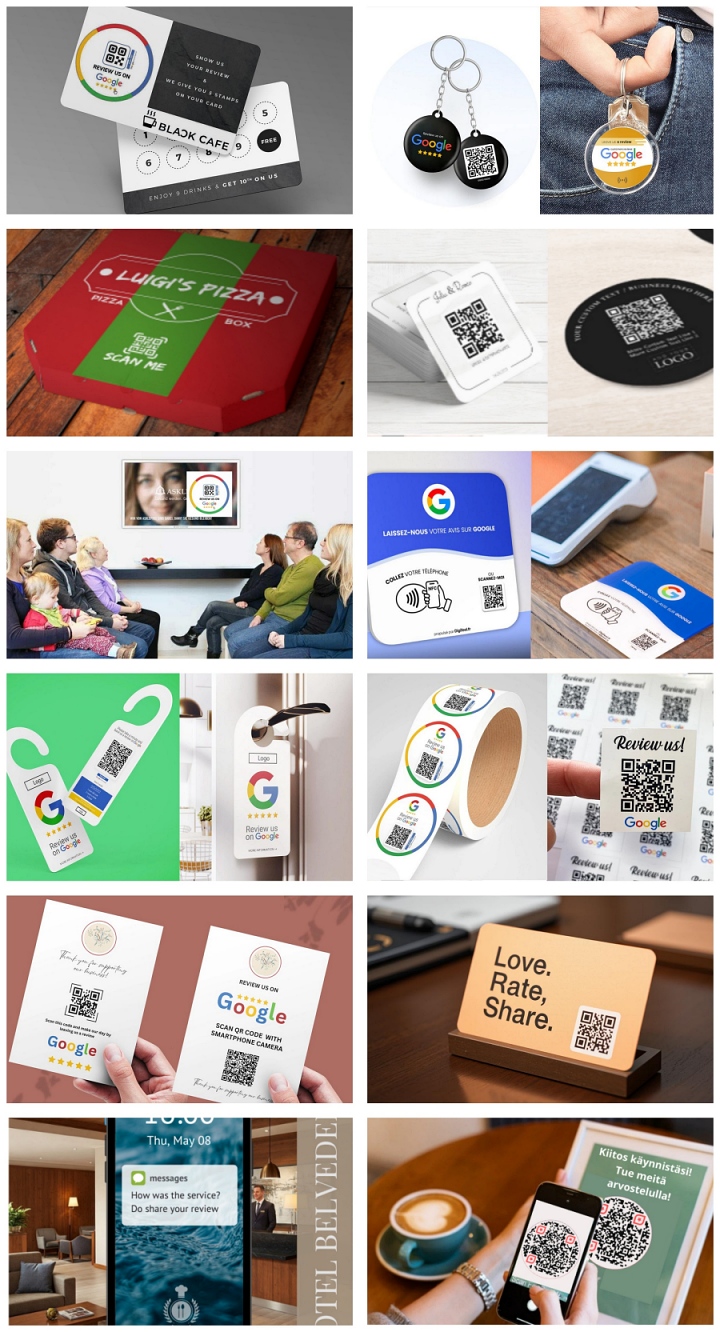
Ideas for Restaurant
In a restaurant environment, the customer journey offers several natural moments to ask for feedback. When you're thinking about where to place your QR code for the best results, consider the stage at which the customer is most likely ready to provide feedback.
The right timing and placement can significantly increase the number of reviews you receive. Here are some ideas and placement suggestions to maximize visibility and encourage customer engagement:
- Tables: On a table tent, a sticker on the table corner, or a small sign—the customer is experiencing the product and service right there.
- Menus: On the last page or on a separate info card inserted within the menu—before ordering or after, while waiting for food.
- Bill Folders: Inside or on top of the folder when the bill is presented—at the end of the service, an ideal moment for overall feedback.
- Condiment Holders: On their side or top—during the meal.
- Takeaway Packaging, Cups, or Bags: As a sticker or printed on the packaging—when the customer has received their item to go, or when they're at home.
- Bar Counter: On the counter itself or on an info board behind it—while ordering or enjoying a drink.
- Coasters: Printed on a coaster—while enjoying a drink.
- Loyalty Cards: On the back of the card or as part of a digital card—as part of an ongoing customer relationship.
- Waiting Area (for those waiting for a table): On a wall or on material on a table—before the service experience begins (e.g., first impression) or when leaving.
- Restroom Doors (inside) or Mirrors: A quiet moment for providing feedback—a reflective moment after the service.
- Digital Screens: If the restaurant has advertising or info screens—at various stages of the customer journey, while waiting or dining.
- Customer Wi-Fi Login Page: An easy way to request feedback immediately upon connecting to the internet—right at arrival or at the start of the meal.
- Terrace Area Tables/Walls: An important seasonal placement for outdoor spaces—same as indoors, during or after dining.
- Photogenic "Insta-spots": If the restaurant has a designated spot for taking photos, the QR code can also link to feedback—a moment when the customer is active and sharing their experience.
- A small, elegant card inside the bill folder, perhaps with a short, personalized "Thank you from the team!" message. This feels less transactional.
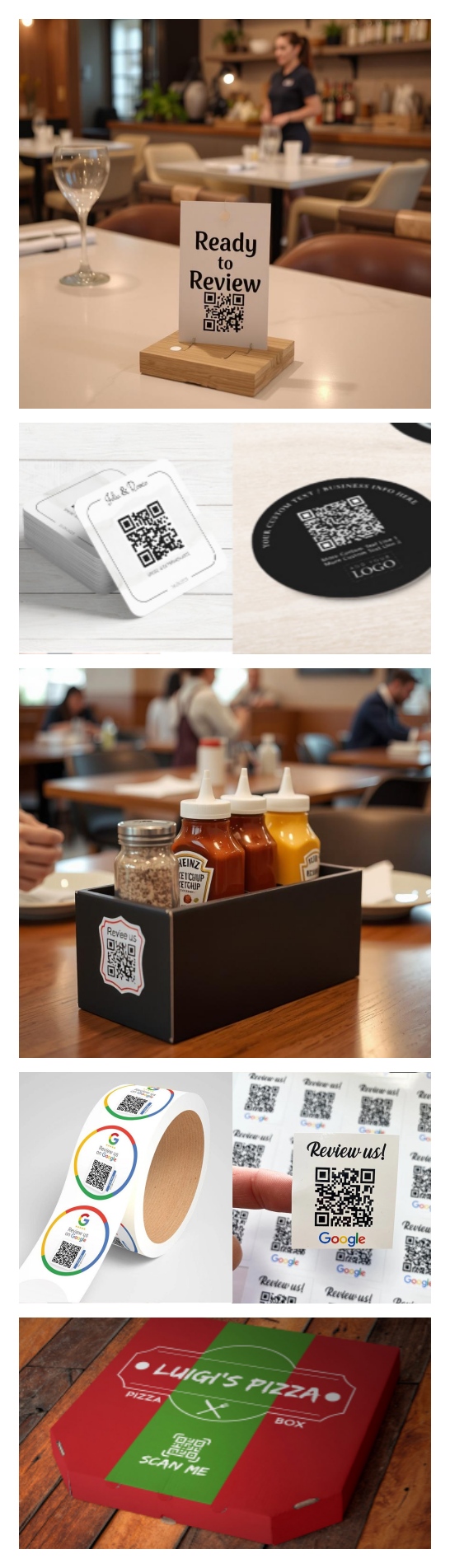
Ideas for a hotel
A hotel experience is shaped by many different encounters and services, offering several natural moments to ask for feedback. Here are some ideas for effective QR code placements throughout your hotel's various areas:
- Reception Desk: At check-in/check-out, when the customer's hotel experience is just beginning or ending.
- Room Key Holder or Key Card Itself: Travels with the guest throughout their stay and is often visible. Easy to scan at any point during their visit.
- Welcome Letter or Card in the Room: Often one of the first things a guest sees upon entering their room.
- In-Room Folder or Information Booklet: Already contains important information about hotel services and facilities. On the nightstand or desk: a small, discreet stand or sticker—easy to spot when relaxing in the room.
- Wi-Fi Information Card or Login Page (physical material): Guests often look for Wi-Fi details immediately upon entering their room.
- Elevators: On the wall or next to the door—guests often have a moment while waiting for or riding the elevator.
- Lobby Areas, Hallways, and Lounges: On tables, info boards, or walls—a relaxed moment to take in their surroundings and give feedback.
- Hotel Restaurant or Bar Tables/Menus: If guests are using the hotel's own dining services.
- Spa, Sauna, Meeting Room, or Other Service Point Receptions/Changing Rooms: For collecting feedback related to a specific service immediately after the experience.
- TV Screen Info Channel or Welcome Display: If your hotel's TV system allows for a QR code to be shown permanently or as part of a welcome message.
- Invoice/Receipt: During check-out—the last tangible contact and a good moment to request overall feedback.
Automated Feedback Requests (SMS, WhatsApp message, email) sent after check-out are an effective way to gather feedback automatically and with a slight delay. You can add the URL of the Feedback Form to your email easily.
Check if this feature is included in your FABBLO package, or contact us if you'd like to learn more about these automation possibilities!
Check if this feature is included in your FABBLO package, or contact us if you'd like to learn more about these automation possibilities!
What's the one crucial step
that many businesses miss—that could multiply the number of reviews you get?